Due to server slowness, downtime, and other issues, Eclipse will be moving to a more stable and efficient platform that should result in much better stability. There is no timeline for this yet, just want you to know what's happening with all the downtime and I have a plan to fix it.

Userscript - Please Help

The place to chill and talk about anything not related to technology.
The-10-Pen
Posts: 462
Joined: 16 Feb 2025, 08:43
OS: Win10 2016 LTSB
Has thanked: 8 times
Been thanked: 83 times
United States of America

Userscript - Please Help

Unread post by The-10-Pen »

I'm hoping there are some userscript users here.
I please need help with what should be simple.
I need a small userscript (Tampermonkey) that *REMOVES* the inert attribute/element from ALL div tags on a given page.

Please and thanks.

ie, my page (Hulu's browse page) has "carousels" that default to only 5 being visible.
I have a custom css that allows MUCH more than 5 but the inert needs REMOVED in order to make them accessible/clickable.
2025-06-03_8-16-08.jpg
2025-06-03_8-16-08.jpg (262.16 KiB) Viewed 5231 times

The-10-Pen
Posts: 462
Joined: 16 Feb 2025, 08:43
OS: Win10 2016 LTSB
Has thanked: 8 times
Been thanked: 83 times
United States of America

Userscript - Please Help

Unread post by The-10-Pen »

Still open for alternatives/suggestions for a more automated approach.
But in the meantime, I was able to create a workaround.

I add vertical-zoom/horizontal-zoom/refresh/scroll "buttons" to all of my video streaming web sites.
They are technically only visible during "hover" but are all turned on here to demonstrate.

The workaround was to add a new button and assign an "addEventListener" 'click' function to the new button.


2025-06-03_9-49-47.jpg
2025-06-03_9-49-47.jpg (64.81 KiB) Viewed 5221 times

User avatar
teknixstuff
Posts: 40
Joined: 15 Aug 2024, 21:25
OS: W10 LTSC 2021 x64
Has thanked: 5 times
Been thanked: 20 times
Contact:

Userscript - Please Help

Unread post by teknixstuff »

This should do it:

Code: Select all

(function paint(){
  requestAnimationFrame(paint);
  document.querySelectorAll('div').forEach(e=>{
    e.removeAttribute('inert');
  });
})();
Developer of Revert8Plus, Shockwave Flashback, Dreamscene reloaded, and other software. Check out my website!

The-10-Pen
Posts: 462
Joined: 16 Feb 2025, 08:43
OS: Win10 2016 LTSB
Has thanked: 8 times
Been thanked: 83 times
United States of America

Userscript - Please Help

Unread post by The-10-Pen »

Awesome! Thanks!
That did the trick. :D

The-10-Pen
Posts: 462
Joined: 16 Feb 2025, 08:43
OS: Win10 2016 LTSB
Has thanked: 8 times
Been thanked: 83 times
United States of America

Userscript - Please Help

Unread post by The-10-Pen »

One more small tidbit of assistance, please.

I need a way to PASTE a six-digit code onto a page.
The first box doesn't need selected for a ctrl-v to paste the six-digit code.
ie, as long as the browser tab is active, then a ctrl-v pastes from the clipboard and into all six boxes.
Basically, the code is COPIED from an EMAIL but then needs PASTED to Hulu's STUPID six-code page.
But I want to be able to use MOUSE ONLY, no keyboard!
The page doesn't have a "paste" context menu. :(

https://auth.hulu.com/web/login/enter-passcode
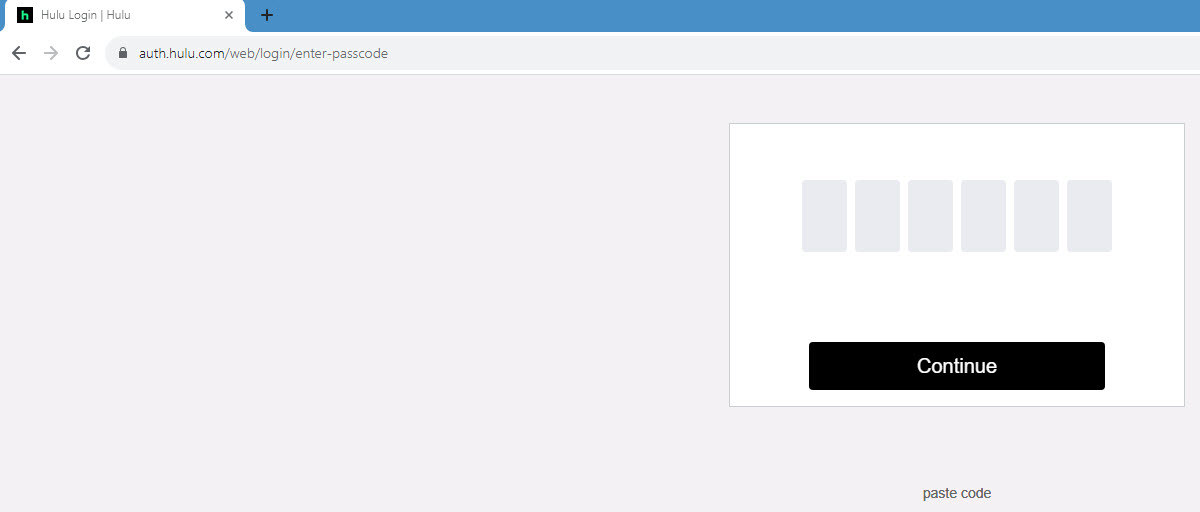
2025-06-05_10-44-48.jpg
2025-06-05_10-44-48.jpg (34.03 KiB) Viewed 5161 times


I use the below and it works on all other web sites that I've tried this on, it just doesn't work for Hulu's STUPID passcode page.
I click the "paste code" and then click the input field to paste into.
Works for usernames and passwords, just not this STUPID passcode on Hulu.


(function() {

let html = document.querySelector("html");
let btnV = document.createElement("buttonV");

btnV.innerHTML = "paste code";
btnV.style.display = "block";
btnV.style.position = "fixed";
btnV.style.top = "410px";
btnV.style.left = "calc(50vw - 40px)";
btnV.style.zIndex = "999999";
btnV.style.color = "#666";
btnV.style.cursor = "pointer";
btnV.style.fontSize = "14px";
btnV.style.fontFamily = "sans-serif";
btnV.style.textAlign = "center";
btnV.style.width = "80px";
btnV.style.opacity = '1';

html.appendChild(btnV);

function btnVFunction() {
const pasteButton = document.querySelector('input');
pasteButton.addEventListener('click', async () => {
try {
const text = await navigator.clipboard.readText()
document.querySelector('input').value += text;
} catch (error) {}});
}

btnV.addEventListener('click', btnVFunction);
})();

The-10-Pen
Posts: 462
Joined: 16 Feb 2025, 08:43
OS: Win10 2016 LTSB
Has thanked: 8 times
Been thanked: 83 times
United States of America

Userscript - Please Help

Unread post by The-10-Pen »

Disregard. No longer needed. Turns out that Chrome already has this feature.
The "Edit" in the three-bubble menu has three buttons that are NOT EVEN LABELED.
These are "cut", "copy", and "paste" functions.
Unsure why they HAVE NO LABEL, not even so much as a tooltip when hovered.

2025-06-05_19-55-14.jpg
2025-06-05_19-55-14.jpg (32.23 KiB) Viewed 5142 times

The-10-Pen
Posts: 462
Joined: 16 Feb 2025, 08:43
OS: Win10 2016 LTSB
Has thanked: 8 times
Been thanked: 83 times
United States of America

Userscript - Please Help

Unread post by The-10-Pen »

Please offer assistance.
When I load CBS Sports page ( https://www.cbssports.com/ ), the scoreboard banner defaults to Golf.
I want it to default to MLB.

The below is working to 'select' the MLB option, but the scoreboard stays on Golf. :evil:

// ==UserScript==
// @name - Auto-Select Dropdown Menus
// @include *
// @grant none
// ==/UserScript==

setInterval(function() {
(document.querySelector && document.querySelector('select[class="Saag-pickerSelect"]') || []).value = 'Saag-carouselWrap--mlb';
}, 1000);

Post Reply

Who is online

Users browsing this forum: No registered users and 2 guests