Page 16 of 25
r3dfox, ESR is now in security madness too!
Posted: 14 Nov 2025, 05:07
by Taiclaw

ESR is now in security madness too!
r3dfox, a modern Firefox based web browser for Windows Vista, 7, and 8!
Posted: 14 Nov 2025, 17:37
by Duke
Taiclaw wrote: ↑14 Nov 2025, 04:43
A subpage containing the entered postal code and the corresponding store to choose to view the relevant brochure.
This subpage only works with a current browser!
I don't understand what you're talking about. Can you post a screenshot ?
Taiclaw wrote: ↑14 Nov 2025, 04:43
Because of less problems!!!
What kind of problems ?
r3dfox, a modern Firefox based web browser for Windows Vista, 7, and 8!
Posted: 16 Nov 2025, 15:47
by Nobody
Thank you for version 144.

r3dfox, a modern Firefox based web browser for Windows Vista, 7, and 8!
Posted: 18 Nov 2025, 19:05
by TSNH
What is this "Strict" setting actually?
I always set cookies to custom and "All cross-ste cookies"
Is strict the same?
r3dfox, a modern Firefox based web browser for Windows Vista, 7, and 8!
Posted: 18 Nov 2025, 19:12
by xperceniol_sal
TSNH wrote: ↑18 Nov 2025, 19:05
What is this "Strict" setting actually?
I always set cookies to custom and "All cross-ste cookies"
Is strict the same?
I also do the same ... I disable all cross-site cookies ... I've been wondering the same thing


r3dfox, a modern Firefox based web browser for Windows Vista, 7, and 8!
Posted: 18 Nov 2025, 21:05
by Duke
TSNH wrote: ↑18 Nov 2025, 19:05
What is this "Strict" setting actually?
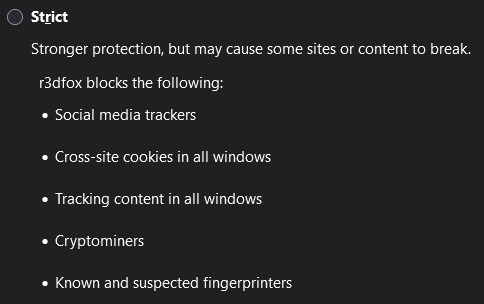
- ETP-Strict.png (8.44 KiB) Viewed 71737 times
r3dfox, a modern Firefox based web browser for Windows Vista, 7, and 8!
Posted: 19 Nov 2025, 00:02
by xperceniol_sal
Duke wrote: ↑18 Nov 2025, 21:05
TSNH wrote: ↑18 Nov 2025, 19:05
What is this "Strict" setting actually?
ETP-Strict.png
Hi Duke ... unfortunately I don't think your picture (alone) best answers our question - What is the difference between "strict" [which] (as your picture indicates) blocks cross-site cookies VS "custom" and setting to block all cross-site cookies ... what is the difference ... is "custom" 'strict-er'? Of course Mypal68 has those same settings. When you get the chance, would/could you better clarify for us. Thank you in advance.
Sal
PS: Sorry about the multiple edits ... just sometimes its hard for me to get across what I'm thinking.

r3dfox, a modern Firefox based web browser for Windows Vista, 7, and 8!
Posted: 19 Nov 2025, 09:17
by Duke
xperceniol_sal wrote: ↑19 Nov 2025, 00:02
What is the difference between "strict" [which] (as your picture indicates) blocks cross-site cookies VS "custom" and setting to block all cross-site cookies
I believe it's the same. Maybe the_r3dacted, ex K4sum1, can confirm that.
Custom allows you to "tweak" the settings while Strict doesn't. I've explained my choices in this post:
https://board.eclipse.cx/viewtopic.php?p=7596#p7596
r3dfox, a modern Firefox based web browser for Windows Vista, 7, and 8!
Posted: 20 Nov 2025, 00:41
by xperceniol_sal
r3dfox, a modern Firefox based web browser for Windows Vista, 7, and 8!
Posted: 20 Nov 2025, 01:18
by K4sum1
Just name change, afaik strict should be the same as custom with everything enabled.
r3dfox, a modern Firefox based web browser for Windows Vista, 7, and 8!
Posted: 09 Dec 2025, 20:54
by Duke
Firefox 146 has been released with tons of security fixes:
https://www.mozilla.org/en-US/security/advisories/mfsa2025-92/
Just saying

And there is also this:
https://www.firefox.com/en-US/firefox/146.0/releasenotes/
Changed
Firefox removed support for Direct2D on Windows. If you still require Direct2D support, please use ESR 140.0 or higher.
r3dfox, a modern Firefox based web browser for Windows Vista, 7, and 8!
Posted: 10 Dec 2025, 15:10
by Duke
R3dfox 145.0.2 has been released:
https://github.com/Eclipse-Community/r3dfox/releases/tag/v145.0.2
Thanks!

I've noticed that gfx.direct2d.disabled is already set to true in versions 144 and 145.
I don't see/feel any difference on Windows 8.1 but I'm not sure about Windows 7 and Vista.
r3dfox, a modern Firefox based web browser for Windows Vista, 7, and 8!
Posted: 12 Dec 2025, 05:20
by K4sum1
Something I've had in mind, but I just don't have the time to look into is that I'm 90% sure that the changes that broke DRM in r3dfox 144 should be reversible by the user.
Potentially relevant preferences:
media.eme.enabled
media.gmp-manager.url
media.gmp-manager.url.override
media.gmp-provider.enabled
media.gmp-gmpopenh264.enabled
r3dfox, a modern Firefox based web browser for Windows Vista, 7, and 8!
Posted: 12 Dec 2025, 17:59
by Duke
the_r3dacted wrote: ↑12 Dec 2025, 05:20
the changes that broke DRM in r3dfox 144 should be reversible by the user.
Potentially relevant preferences:
media.eme.enabled
I've tried with R3dfox 146.0:
https://github.com/Eclipse-Community/r3dfox/releases/tag/v146.0
I've enabled media.eme.enabled only and magic! Widevine has automatically downloaded and installed and it's working fine

Thanks!
However, I've noticed a problem on this page:
https://www.samsung.com/uk/smartphones/galaxy-s25/
The FAQ part doesn't properly display and some buttons have no text:
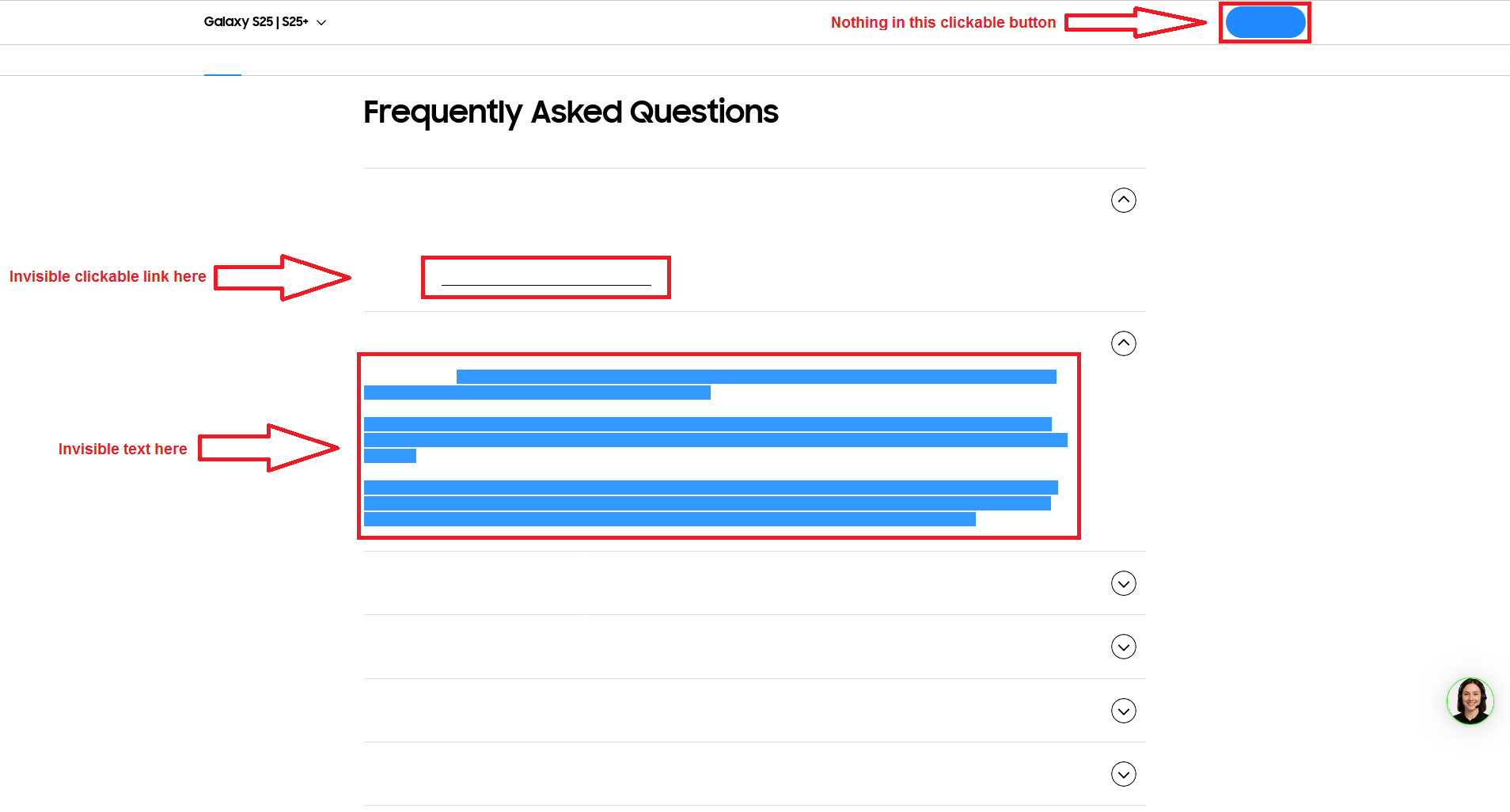
- R3dfox-S25.png (46.51 KiB) Viewed 65659 times
I can click on the links and highlight the text but nothing is shown on the screen.
ETP is OFF, uBlock is OFF, CanvasBlocker is OFF, NoScript allows everything.
And if every script is blocked with NoScript I can see the text:
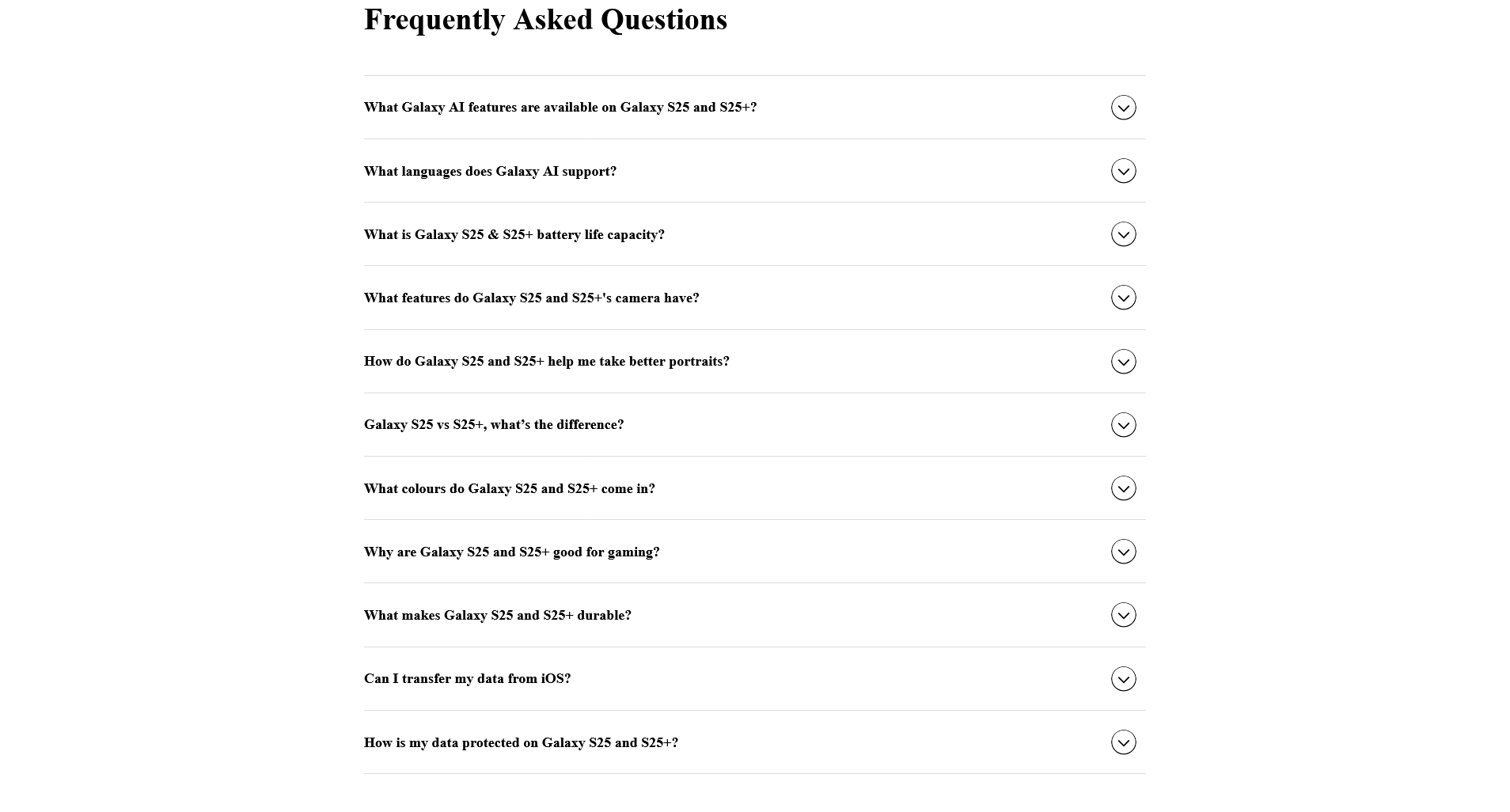
- R3dfox-S25-NoScriptON.png (84.67 KiB) Viewed 65659 times
Same thing with Firefox 115.31 ESR.
r3dfox, a modern Firefox based web browser for Windows Vista, 7, and 8!
Posted: 12 Dec 2025, 20:58
by K4sum1
If it happens in both r3dfox and Firefox 115 ESR, it's probably this.
https://github.com/e3kskoy7wqk/Firefox-for-windows-7/issues/79
It probably uses scripts to load some weird fancy font.
r3dfox, a modern Firefox based web browser for Windows Vista, 7, and 8!
Posted: 12 Dec 2025, 23:52
by Duke
Does it happen to you too ?
When I refresh the page I can see the text for a very short while then it vanishes:

- R3dfox-S25-Refresh.png (25.36 KiB) Viewed 65486 times
After:

- R3dfox-S25-RefreshAfter.png (12.06 KiB) Viewed 65478 times
The page is working fine on my phone so yes, it may be some variable font which requires Windows 10 1709.
r3dfox, a modern Firefox based web browser for Windows Vista, 7, and 8!
Posted: 13 Dec 2025, 12:41
by K4sum1
Yes, what I said was right, they use their own "SamsungOne" font that doesn't display on 7.
r3dfox, a modern Firefox based web browser for Windows Vista, 7, and 8!
Posted: 13 Dec 2025, 17:46
by Duke
the_r3dacted wrote: ↑13 Dec 2025, 12:41
they use their own "SamsungOne" font that doesn't display on 7.
I'm on Windows 8.1 and the dev tools reports SamsungOne 400 and 700 but in
https://fontdrop.info I can use it and see it in the Type yourself tab:
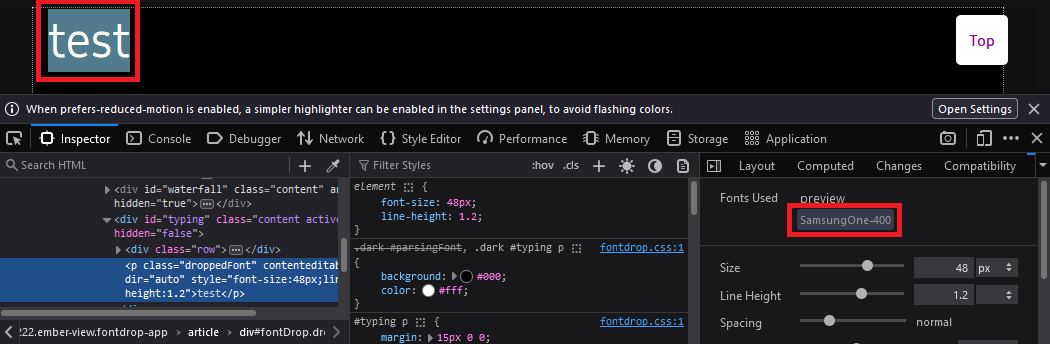
- SamsungOne-FontDrop.png (35.74 KiB) Viewed 65273 times
So I'm puzzled

r3dfox, a modern Firefox based web browser for Windows Vista, 7, and 8!
Posted: 13 Dec 2025, 20:36
by The-10-Pen
Just reading through the discussion, it was not stated that the font itself is the problem, but rather that a javascript loading the font is the issue.
Which would also explain why NoScript would render the site properly.
Focus needs to be on the javascript side of things, not the font side of things.
r3dfox, a modern Firefox based web browser for Windows Vista, 7, and 8!
Posted: 13 Dec 2025, 21:00
by The-10-Pen
Of course, css things that "flex" things into position could also be a probably cause.
I would need to install r3dfox into a VM to go any further.
Tomorrow perhaps, if nothing is found beforehand.
r3dfox, a modern Firefox based web browser for Windows Vista, 7, and 8!
Posted: 13 Dec 2025, 21:40
by Duke
Duke wrote: ↑13 Dec 2025, 17:46
the dev tools reports SamsungOne 400 and 700 but in
https://fontdrop.info I can use it and see it in the Type Yourself tab
It works with the TTF fonts but it doesn't work with the SamsungOne-*00.woff2 web fonts loaded by the page.
So I guess they are variable fonts that don't work on older Windows versions before W10 1709. But on
https://v-fonts.com I get something like this ☒ while on
https://fontdrop.info no character is shown at all.
r3dfox, a modern Firefox based web browser for Windows Vista, 7, and 8!
Posted: 13 Dec 2025, 23:11
by The-10-Pen
Duke wrote: ↑13 Dec 2025, 21:40
So I guess they are variable fonts that don't work on older Windows versions before W10 1709.
I run Win10 1607 with ZERO updates.
The variable fonts WORK for me (albeit in Chrome v140).
To each their own, of course, I no longer use non-Chrome but WILL try in a VM within the next day or so.
It appears this has nothing to do with what Windows version is being ran, but rather Chrome versus non-Chrome.
I could be wrong, it wouldn't be my first time, lol.
r3dfox, a modern Firefox based web browser for Windows Vista, 7, and 8!
Posted: 14 Dec 2025, 11:05
by Duke
The-10-Pen wrote: ↑13 Dec 2025, 23:11
It appears this has nothing to do with what Windows version is being ran
It does, I'm now sure it's about the OS.
I've tried Chromium on my Windows 8.1 with the same result: invisible text, blank buttons.
Then I've copied my portable R3dfox I'm actually using on Windows 8.1 to my Windows 10 computer and bingo! The page is working fine.
Workaround for Windows 7 & 8: in the Settings → General → Fonts → Advanced untick Allow pages to choose their own fonts.
It may look ugly in some cases so I suggest to do it on the fly, only when needed.
BTW, versions 140.6.0esr and 128.14.1-2esr of R3dfox have been released:
https://github.com/Eclipse-Community/r3dfox/releases/tag/v140.6.0esr
https://github.com/Eclipse-Community/r3dfox/releases/tag/v128.14.1-2esr
NOTE: There are a bunch of changes made to this build which may break compatibility with websites and may change default settings. Please let me know if 128.14.1/140.5.0esr+ or 144+ breaks any websites for you.
r3dfox, a modern Firefox based web browser for Windows Vista, 7, and 8!
Posted: 14 Dec 2025, 15:42
by GoodConscience
Duke wrote: ↑14 Dec 2025, 11:05
Workaround for Windows 7 & 8: in the Settings → General → Fonts → Advanced untick Allow pages to choose their own fonts.
It may look ugly in some cases so I suggest to do it on the fly, only when needed.
As you wrote, this is a global font setting, affecting ALL web pages loaded in
r3dfox; what I did on my
Vista SP2 OS + r3dfox is:
Since
uBlock Origin is already installed here, I configured the extension to
selectively block remote fonts ONLY on
www.samsung.com; this way, the webpage uses local fonts, already compatible with the OS:

If you click the padlock button in the uBO UI, it'll make this a permanent change
just for this website ; hope I've helped
...
r3dfox, a modern Firefox based web browser for Windows Vista, 7, and 8!
Posted: 14 Dec 2025, 17:15
by Duke
GoodConscience wrote: ↑14 Dec 2025, 15:42
Since
uBlock Origin is already installed here, I configured the extension to
selectively block remote fonts ONLY on
www.samsung.com; this way, the webpage uses local fonts, already compatible with the OS:
If you click the padlock button in the uBO UI, it'll make this a permanent change
just for this website ; hope I've helped
...
Very good point, your workaround is much better than mine
Sometimes I forget about the powerful features of uBlock Origin.
However, I don't understand why you got a black background at the top of the page while mine is white, even though I'm using the black theme and the black mode
But that's not very important.
r3dfox, a modern Firefox based web browser for Windows Vista, 7, and 8!
Posted: 14 Dec 2025, 19:49
by The-10-Pen
Duke wrote: ↑14 Dec 2025, 17:15
However, I don't understand why...
Note from his screen cap that he has 3 userstyles active.
So it could be his userstyles.
r3dfox, a modern Firefox based web browser for Windows Vista, 7, and 8!
Posted: 14 Dec 2025, 21:52
by GoodConscience
Duke wrote: ↑14 Dec 2025, 17:15
However, I don't understand why
you got a black background at the top of the page while mine is white, even though I'm using the black theme and the black mode
It's because I have
Dark Reader installed and configured to
be enabled by default on ALL websites - I then disable it selectively on sites that offer a dark theme themselves
; e.g., here on
board.eclipse.cx I've selected the
Lucid Blue (dark) "style", hence DR doesn't need to run...
r3dfox, a modern Firefox based web browser for Windows Vista, 7, and 8!
Posted: 14 Dec 2025, 23:13
by Duke
That explains it, that's somehow an user style like The-10-Pen said.
Thanks for the info.
r3dfox, a modern Firefox based web browser for Windows Vista, 7, and 8!
Posted: 16 Dec 2025, 00:14
by Nobody
Thank you for version 146.
The user string is Mozilla/5.0 (Windows NT 6.1; rv:131.0) Gecko/20100101 Firefox/131.0
r3dfox, a modern Firefox based web browser for Windows Vista, 7, and 8!
Posted: 16 Dec 2025, 11:58
by Duke
Nobody wrote: ↑16 Dec 2025, 00:14
The user string is Mozilla/5.0 (Windows NT 6.1; rv:131.0) Gecko/20100101 Firefox/131.0
Is it what is reported by this site ? :
https://www.useragentstring.com
If so, then in about:config check the value of the general.useragent.override key.

