Page 1 of 1

Hybrid10 - Modern Kernel, Classic Experience

Posted: 30 Nov 2025, 01:04
by OwnedByWuigi
30/11/25 - BETA 1 NOW OUT! This is a basic preliminary 21H2 Win10 but with the main Telemetry and Update services disabled, and ex7 since yes
tldr-basically a bare minimum testing ISO, Beta 2 will be more like the final product
https://1drv.ms/u/c/35b1abe6940cbbef/ESvqB2-MMx9KjM2pVICiWBYBMJrJaq3aCR3P61tqljcmQQ?e=TgfDgm

Hybrid10 - Modern Kernel, Classic Experience

Posted: 30 Nov 2025, 07:52
by The-10-Pen
Initial comments. Strictly comments, not "critiques".

1) 4.60 GB ISO kind of suggests that this doesn't gain anything over a normal regular ol' Win10.
Of course I mention that before the install is even completed and not yet seeing the end result.
2) Installation takes "forever". Did not time it, per se, just took way longer than any of my other Win10 installs.
Only tested in VirtualBox VM with 4 cores assisgned and 2 GB RAM allocated.
3) My own mistake on this one, but not really sure if a mistake.
I did not "disconnect" the VirtualBox network adapter until on the "Getting ready" screen.
Fingers crossed that it didn't try to perform or download any "updates" before I remembered to disconnect.
4) Strictly personal preference, but is including "Windows Security" inline with classic experience and telemetry removal agenda?
5) AWESOME Win7-ified "start menu" and "systray".
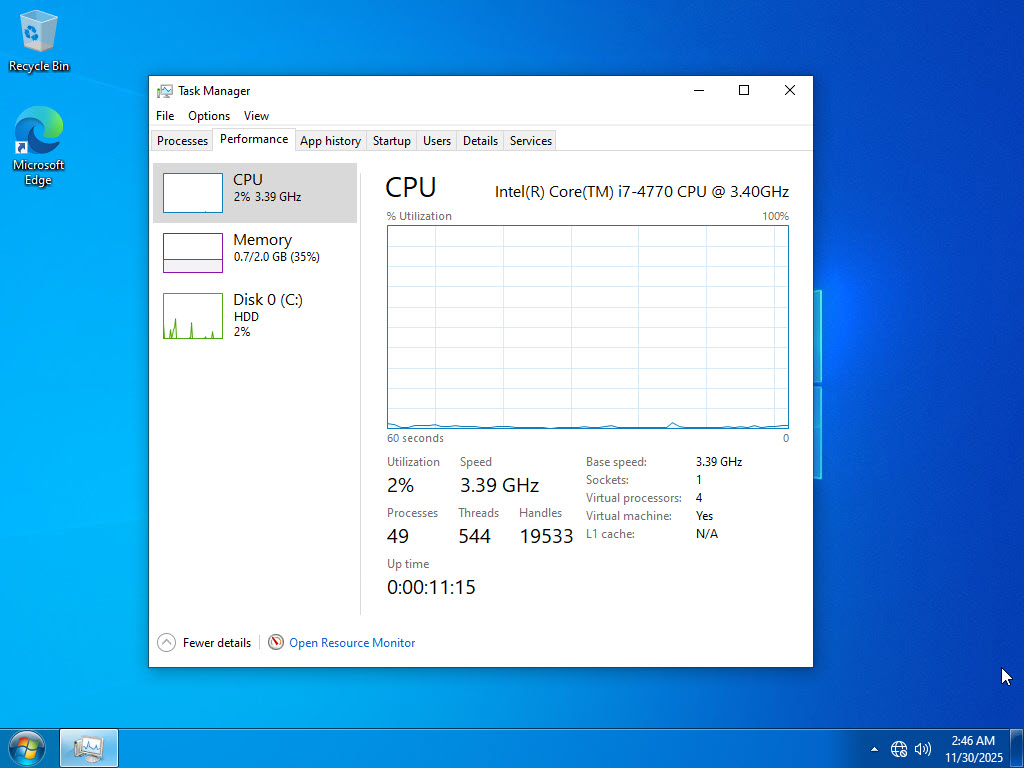
6) I'm showing an idle of 700MB RAM, 2-4% on the CPU, 49 processes, and 544 threads - this to me essentially looks like "normal Win7".
Though I would have to perform additional compare/contrast.
CPU did die down to 1-2% after 10 minutes or so of sitting idle.
Process count was at 45 and thread count at 471 roughly 20 minutes into me first launch.
7) Is "Windows Search" and "Volume Shadow Copy" necessary? Again, kind of cite as personal preference as this is something I normally remove.
8) What about "Windows Security Health" and "Windows Defender SmartScreen" and "Antimalware Service Executable"?
2025-11-30_2-46-56.jpg
2025-11-30_2-46-56.jpg (132.42 KiB) Viewed 2266 times

Hybrid10 - Modern Kernel, Classic Experience

Posted: 30 Nov 2025, 08:00
by The-10-Pen
ps - I could not right-click on desktop and select "Personalize".
2025-11-30_2-58-49.jpg
2025-11-30_2-58-49.jpg (79.39 KiB) Viewed 2262 times

Same goes for right-click on desktop and selecting "Display settings".
2025-11-30_3-01-35.jpg
2025-11-30_3-01-35.jpg (77.08 KiB) Viewed 2262 times

Hybrid10 - Modern Kernel, Classic Experience

Posted: 30 Nov 2025, 08:03
by The-10-Pen
When in the Control Panel, I cannot enter anything into the "Search Control Panel".
ie, I'm not finding any way to remove the desktop Window logo - just a personal preference of course.

Hybrid10 - Modern Kernel, Classic Experience

Posted: 30 Nov 2025, 13:10
by OwnedByWuigi
The-10-Pen wrote: 30 Nov 2025, 08:00 ps - I could not right-click on desktop and select "Personalize".

2025-11-30_2-58-49.jpg


Same goes for right-click on desktop and selecting "Display settings".

2025-11-30_3-01-35.jpg
That is because of the lack of UWP (at least on ex7), you can revert back to Windows 10 explorer if that suits you, but I am working on reverting as many UWP settings as I can to Control Panel

Hybrid10 - Modern Kernel, Classic Experience

Posted: 30 Nov 2025, 13:32
by OwnedByWuigi
Windows Search and Security will be kept, but I will include a registry script that fully debloats the remaining services if you insist.

Hybrid10 - Modern Kernel, Classic Experience

Posted: 30 Nov 2025, 15:24
by The-10-Pen
OwnedByWuigi wrote: 30 Nov 2025, 13:10That is because of the lack of UWP (at least on ex7) <snip> I am working on reverting as many UWP settings as I can to Control Panel
That makes sense.

Hybrid10 - Modern Kernel, Classic Experience

Posted: 30 Nov 2025, 15:28
by The-10-Pen
OwnedByWuigi wrote: 30 Nov 2025, 13:32 Windows Search and Security will be kept, but I will include a registry script that fully debloats the remaining services if you insist.
Totally up to you on your end.
I will already perform a debloat on any machines that I may deploy.
Specifically, I can see this being good for my Core2 Quad Q6700.
It's my only last remaining hardware that only has 4 GB RAM.
It only gets used for MODERN web browser, Office 2007, and Quicken 2010.

edit: oh, and "NAPS2" scanning from an old HP PSC 1610 that is only ever used for scanning.