Page 1 of 1
Windows 11 Retrograde
Posted: 10 Apr 2026, 12:01
by demaxxander04
 What is Windows 11 Retrograde?
Windows 11 Retrograde is a Windows modification based on Windows 11 IoT LTSC 2024, which tries to remind Windows XP, if it was made in current times, albeit without bloatware like Copilot, Edge or others.
Features:
• nostalgic vibe of Windows XP
• various vintage games included (featuring classics, such as Solitaire, Pinball, Purble Place and others!)
• no bloatware featured in regular Windows 11 editions
• a slightly better performance than stock Windows 11
• no TPM or Secure Boot requirements
• limited 16-bit support, provided by OTVDM
Version 5.11_4 ISO Download
https://drive.google.com/file/d/1BFFCY6NEsqELpxP5QvR0mMC_knWcaJR4/view?usp=sharing
If you encounter an issue with the 0xC0000005 installation error, you have to restart it
Raytek forum post:
https://forum.raytek.cafe/viewtopic.php?t=76
Can I run this on real machine?
Yes you can, but I must recommend to install on VM first and then if you are comfy enough to use it as daily drive OS, you can use it on your host
What are system requirements for this mod?
This modification of the operating system has the same requirements as Windows 11 IoT LTSC 2024, which can be checked at Microsoft’s website.
The OS doesn’t require TPM 2.0 nor Secure Boot to work, due to its base.
Is Windows pre-activated?
For legal reasons, Windows is not activated. You need to activate Windows yourself.
How do get store on this mod?
Use this command on powershell as administrator:
If it doesn't work, you can try this:
https://github.com/minihub/LTSC-Add-MicrosoftStore
Do games work on this mod?
Yes! but for UWP games (Forza Horizon series for example) require Xbox dependencies to run:
AppInstaller, Xbox Identity Provider, Xbox GameBar, Xbox app
For more information about this modification:
https://drive.google.com/file/d/13qO60P6LSIITO2f4inOlHzPaWXYHZbEj/view?usp=sharing
Other Screenshots:
- Setup (Rectify11 2.5 modified):

- Multicolor Variant:

- Light Theme:

- Paranoid Theme:

- Luna Theme (Beta):

- Windows 11 (Bloom):

- Shutdown prompt:

Windows 11 Retrograde
Posted: 10 Apr 2026, 14:19
by The-10-Pen
demaxxander04 wrote: ↑10 Apr 2026, 12:01
albeit without bloatware like Copilot,
Edge or others.
I haven't allowed it internet access, but it looks like Edge is included and attempts to update at every boot.
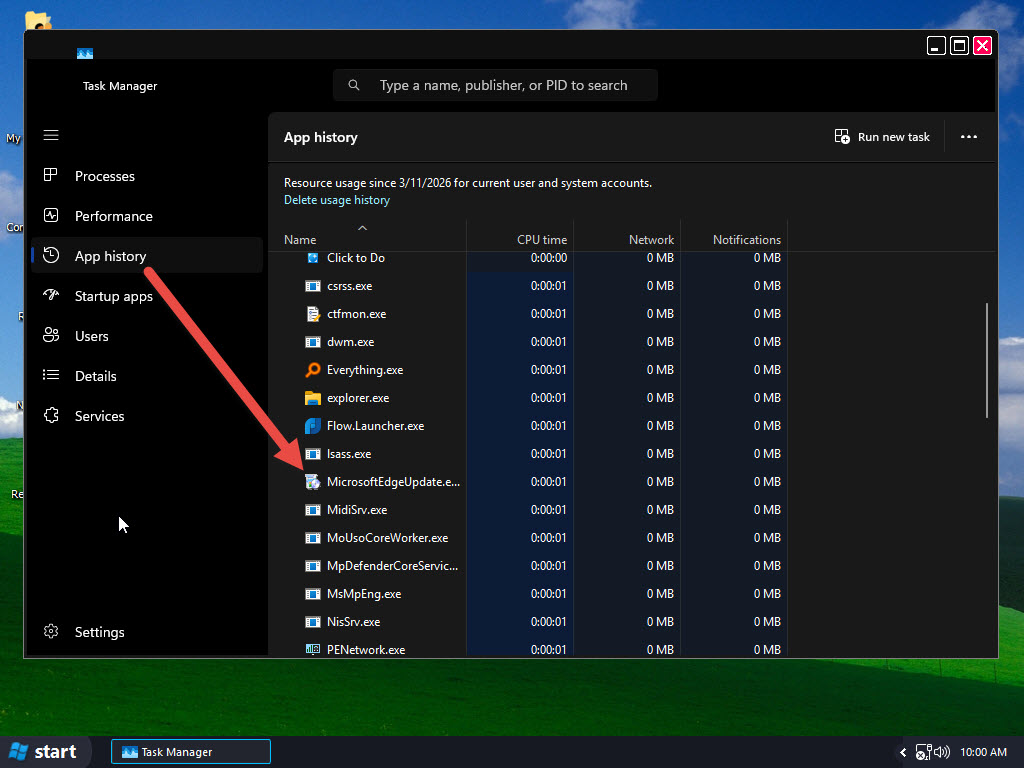
- 2026-04-10_10-00-47.jpg (155.48 KiB) Viewed 11459 times
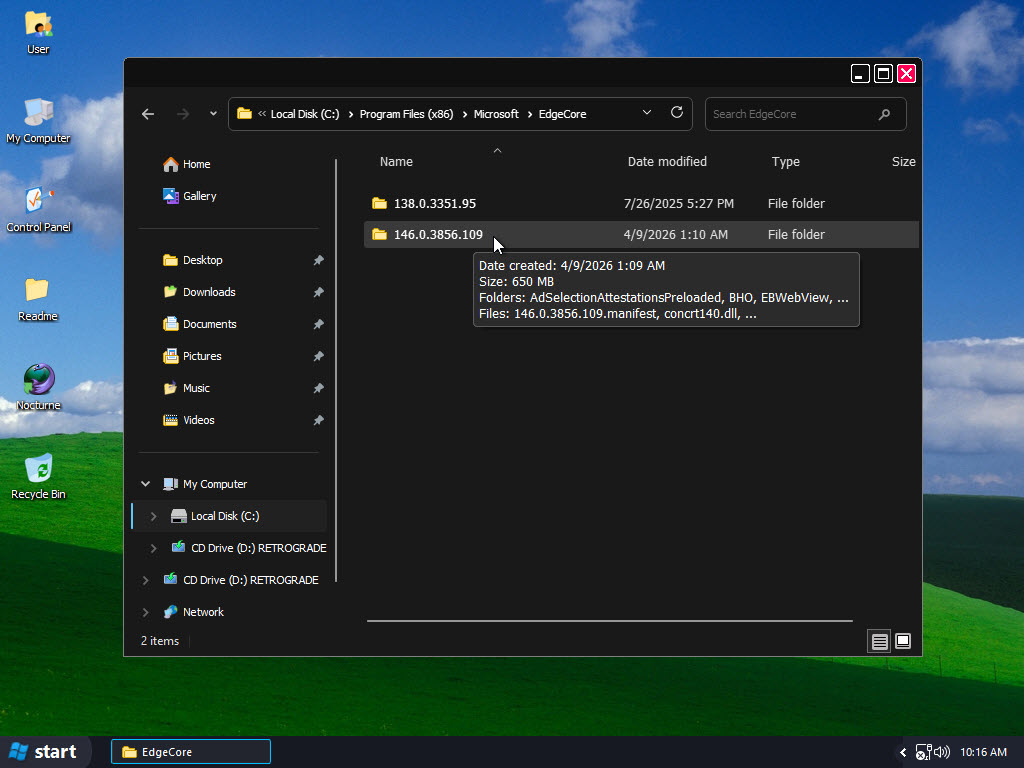
- 2026-04-10_10-16-49.jpg (127.22 KiB) Viewed 11459 times
Windows 11 Retrograde
Posted: 11 Apr 2026, 00:15
by enmanuel
Interesting mod, i quite like the themes.
One important thing i must ask: Does it have support for Windows Update and Windows Defender? It's basically what i look for in a custom Windows 11 ISO.
Windows 11 Retrograde
Posted: 11 Apr 2026, 04:55
by The-10-Pen
Yes it does.
But... GOOD LUCK WITH THAT !!! Those are the first things I want ***REMOVED*** in a custom 11 (or even 10) !!! !!! !!!
Windows 11 Retrograde
Posted: 11 Apr 2026, 10:33
by demaxxander04
The-10-Pen wrote: ↑10 Apr 2026, 14:19
demaxxander04 wrote: ↑10 Apr 2026, 12:01
albeit without bloatware like Copilot,
Edge or others.
I haven't allowed it internet access, but it looks like Edge is included and attempts to update at every boot.
2026-04-10_10-00-47.jpg
2026-04-10_10-16-49.jpg
I don't think it will ever install or run Edge even if the update service still exists and I think that's normal, I used this script to remove it:
https://gist.github.com/ave9858/c3451d9f452389ac7607c99d45edecc6
I used it for so long and still didn't got Edge!
Windows 11 Retrograde
Posted: 11 Apr 2026, 10:33
by demaxxander04
enmanuel wrote: ↑11 Apr 2026, 00:15
Interesting mod, i quite like the themes.
One important thing i must ask: Does it have support for Windows Update and Windows Defender? It's basically what i look for in a custom Windows 11 ISO.
Yes it does have support
Windows 11 Retrograde
Posted: 11 Apr 2026, 10:38
by demaxxander04
The-10-Pen wrote: ↑11 Apr 2026, 04:55
Yes it does.
But... GOOD LUCK WITH THAT !!! Those are the first things I want ***REMOVED*** in a custom 11 (or even 10) !!! !!! !!!
If you want Windows Update disabled, you can actually use this
script (C:\Windows\windows-update-disabler-main) pre-included in this mod, even says in the readme documents!
For Defender, you can download
Defender Control to disable it but you have to turn off Real Time Protection before using it!
I recommend doing system restore backup before doing anything!
Windows 11 Retrograde
Posted: 11 Apr 2026, 10:48
by The-10-Pen
I for one don't like the word "think", but I can look past that (for now).
Also, I would prefer an
ENTIRE LIST of scripts that were used, no matter how big or small that
ENTIRE LIST is.
Also, what the H#LL is "everything.exe", "flow.launcher", etc. Seems this build has a TON of stuff ADDED.
TRUST is gained by providing that LIST upfront also!
I can *NOT* "trust" a build like this, no way, no how! But a LIST of what was ADDED would go a *VERY LONG WAY* towards 'gaining that trust'.
ie, I already have scripts that remove EDGE. And I don't have any Edge Updater running in the background! Nor that gigantic folder wasting space.
And I'm one of those old-schooler's still using QUICKEN for my checking account!
IT REQUIRES WEBVIEW RUNTIME, so no, that Edge Updater is not needed.
ps - sure, a great project!
BUT... folks that share things like this have to have the "skin" to be able to listen to both "positive" *AND* "negative" feedback...
I'm just saying that from what I have seen, I CAN NOT "TRUST" THIS BUILD.
And that is BEFORE allowing it internet access and logging any "activity" that this build does that a "normal" 11 does not do!
Or, preferrably, logging any "activity" that this build does NOT do that a "normal" 11 DOES do!
Windows 11 Retrograde
Posted: 11 Apr 2026, 11:11
by demaxxander04
The-10-Pen wrote: ↑11 Apr 2026, 10:48
I for one don't like the word "think", but I can look past that (for now).
Also, I would prefer an
ENTIRE LIST of scripts that were used, no matter how big or small that
ENTIRE LIST is.
Also, what the H#LL is "everything.exe", "flow.launcher", etc. Seems this build has a TON of stuff ADDED.
TRUST is gained by providing that LIST upfront also!
I can *NOT* "trust" a build like this, no way, no how! But a LIST of what was ADDED would go a *VERY LONG WAY* towards 'gaining that trust'.
ie, I already have scripts that remove EDGE. And I don't have any Edge Updater running in the background! Nor that gigantic folder wasting space.
And I'm one of those old-schooler's still using QUICKEN for my checking account!
IT REQUIRES WEBVIEW RUNTIME, so no, that Edge Updater is not needed.
ps - sure, a great project!
BUT... folks that share things like this have to have the "skin" to be able to listen to both "positive" *AND* "negative" feedback...
I'm just saying that from what I have seen, I CAN NOT "TRUST" THIS BUILD.
And that is BEFORE allowing it internet access and logging any "activity" that this build does that a "normal" 11 does not do!
Or, preferrably, logging any "activity" that this build does NOT do that a "normal" 11 DOES do!
everything.exe is for the
Everything App and I also included
Flow Launcher which it comes with Everything index plugin, if you open Search in start menu, it will redirect to Flow Launcher search!
Everything index does better job at searching files compared to Windows, this is why I included both of these and there's nothing suspicious about them!
as for the scripts:
Edge:
https://gist.github.com/ave9858/c3451d9f452389ac7607c99d45edecc6
WIndows Update:
https://github.com/tsgrgo/windows-update-disabler
that's what I used for now.. I don't remember what else I used, if I do, I will let you know!
and like I told you, it does not install or re-enable Edge itself! If it was doing, then I might work on that, no problem!
Windows 11 Retrograde
Posted: 11 Apr 2026, 11:23
by demaxxander04
The-10-Pen wrote: ↑11 Apr 2026, 10:48
I for one don't like the word "think", but I can look past that (for now).
Also, I would prefer an
ENTIRE LIST of scripts that were used, no matter how big or small that
ENTIRE LIST is.
Also, what the H#LL is "everything.exe", "flow.launcher", etc. Seems this build has a TON of stuff ADDED.
TRUST is gained by providing that LIST upfront also!
I can *NOT* "trust" a build like this, no way, no how! But a LIST of what was ADDED would go a *VERY LONG WAY* towards 'gaining that trust'.
ie, I already have scripts that remove EDGE. And I don't have any Edge Updater running in the background! Nor that gigantic folder wasting space.
And I'm one of those old-schooler's still using QUICKEN for my checking account!
IT REQUIRES WEBVIEW RUNTIME, so no, that Edge Updater is not needed.
ps - sure, a great project!
BUT... folks that share things like this have to have the "skin" to be able to listen to both "positive" *AND* "negative" feedback...
I'm just saying that from what I have seen, I CAN NOT "TRUST" THIS BUILD.
And that is BEFORE allowing it internet access and logging any "activity" that this build does that a "normal" 11 does not do!
Or, preferrably, logging any "activity" that this build does NOT do that a "normal" 11 DOES do!
"The Microsoft Edge Update service might remain, this is normal as it is required for updating WebView2."
Windows 11 Retrograde
Posted: 11 Apr 2026, 12:06
by The-10-Pen
demaxxander04 wrote: ↑11 Apr 2026, 11:11
Everything index does better job at searching files compared to Windows, this is why I included both of these and there's nothing suspicious about them!
"To each their own", as the saying goes.
We have OPPOSITE VIEWS on "searching files".
I disable/remove Windows' own "indexers" and I have NO USE in REPLACING it with something else.
Again, "to each their own".
Windows 11 Retrograde
Posted: 11 Apr 2026, 18:56
by wuggy
You should replace Nocturne with r3dfox.
Windows 11 Retrograde
Posted: 11 Apr 2026, 19:17
by The-10-Pen
OwnedByWuigi wrote: ↑11 Apr 2026, 18:56
You should replace Nocturne with r3dfox.
I prefer Nocturne (if I had to choose between just the two).
Admittedly, I wouldn't have even TRIED IT had it not been mentioned.
It should also be noted, per its repository, it's not a Firefox fork but rather it is a r3dfox fork (ie, "improved upon").
But everyone is going to have their own PERSONAL PREFERENCE.
Windows 11 Retrograde
Posted: 12 Apr 2026, 05:25
by wuggy
Improved upon what? Only difference I can see between the two browsers are the branding.
Windows 11 Retrograde
Posted: 12 Apr 2026, 11:33
by The-10-Pen
OwnedByWuigi wrote: ↑12 Apr 2026, 05:25
Improved upon what? Only difference I can see between the two browsers are the branding.
I'll have to take your word for it.
To me, Nocturne just *FEELS* more like a *STANDARDIZED* interface.
To me, r3dfox is HEAVILY THEMED for the DARK MODE USER (of which *I AM NOT*) [to each their own!].
Yeah, I can revert the STUPID dark-sh#t to FOLLOW MY OS SETTINGS, but the trapezoid tabs and title bar color just don't look STANDARD to me.
To me, it technically doesn't really matter.
Neither is my default browser, just something sitting in the background of VMs only and as a HOBBY BROWSER, never as something I use daily.
"To each their own."
Windows 11 Retrograde
Posted: 12 Apr 2026, 14:41
by wuggy
Also you're using Imgur to host your images, I can't see them unless I am using a VPN. Please fix if you can
Windows 11 Retrograde
Posted: 12 Apr 2026, 14:46
by ThatRandomToast
OwnedByWuigi wrote: ↑12 Apr 2026, 14:41
Also you're using Imgur to host your images, I can't see them unless I am using a VPN. Please fix if you can
Does ImgBB work in the UK (at least for now)?
Windows 11 Retrograde
Posted: 12 Apr 2026, 14:46
by wuggy
ThatRandomToast wrote: ↑12 Apr 2026, 14:46
Does ImgBB work in the UK (at least for now)?
Yeah that works from what I can tell
Windows 11 Retrograde
Posted: 12 Apr 2026, 18:53
by Duke
No need of a third party hosting site, just use the attachments feature of the forum like this:
Click on the "Full Editor & Preview" button:
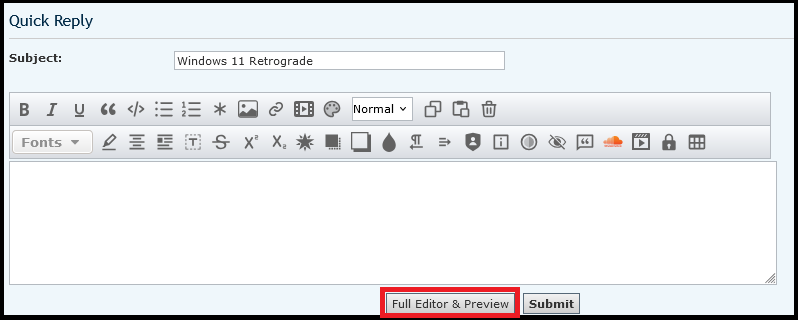
- Eclipse-FullEditor.png (23.47 KiB) Viewed 10857 times
Then Attachments → Add files → Place inline
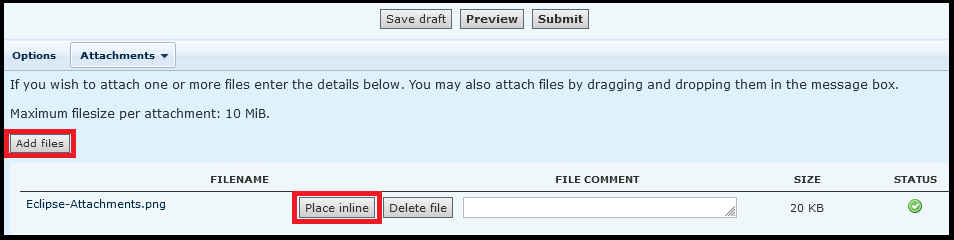
- Eclipse-Attachments.png (15.41 KiB) Viewed 10857 times
Like I did in this post

Windows 11 Retrograde
Posted: 16 Apr 2026, 23:46
by Iffy-chan
ThatRandomToast wrote: ↑12 Apr 2026, 14:46
OwnedByWuigi wrote: ↑12 Apr 2026, 14:41
Also you're using Imgur to host your images, I can't see them unless I am using a VPN. Please fix if you can
Does ImgBB work in the UK (at least for now)?
Imgur was taken down in the UK not because of 'inappropriate content' but because of some other reason, if I remember rightly.
Something to do with data retention issues if I'm not mistaken, there was already a pending case against them from before the age-verification stuff got rolled out.
They didn't want to comply, so off they went.
(Funny how whenever it's the EU doing the exact same fucking shit it's a completely different ballpark and the reaction becomes far less mocking from individuals...)
Windows 11 Retrograde
Posted: 17 Apr 2026, 01:06
by enmanuel
Iffy-chan wrote: ↑16 Apr 2026, 23:46
(Funny how whenever it's the EU doing the exact same fucking shit it's a completely different ballpark and the reaction becomes far less mocking from individuals...)
The UK has just 4 countries with a total population of 60 million people, while the EU has 27 countries with a total population of over
200 450 million people. It's riskier to not comply with the EU than the UK.
Windows 11 Retrograde
Posted: 17 Apr 2026, 02:34
by Duke
enmanuel wrote: ↑17 Apr 2026, 01:06
the EU has 27 countries with a total population of over 200 million people.
More like about 450 million people:
https://en.wikipedia.org/wiki/Demographics_of_the_European_Union
Windows 11 Retrograde
Posted: 17 Apr 2026, 18:19
by enmanuel
Duke wrote: ↑17 Apr 2026, 02:34
More like about 450 million people:
Oh right, I looked at a wikipedia page that didn't list the total population.
Windows 11 Retrograde
Posted: 28 Apr 2026, 08:13
by ThatRandomToast
The "All UWP apps" sub-menu should be renamed to "All Microsoft Store apps" as this sub-menu could contain apps packaged as APPX/MSIX without being built on UWP (Spotify is an example).